Visualizing Regression with the FWL Theorem in R
1. Overview
“What does it actually mean to control for a variable?” This is perhaps the most common question in applied regression — and one of the hardest to answer intuitively. When we say “the effect of coupons on sales, controlling for income,” we are describing a relationship that lives in multidimensional space and cannot be directly plotted on a 2D scatter plot. Or can it?
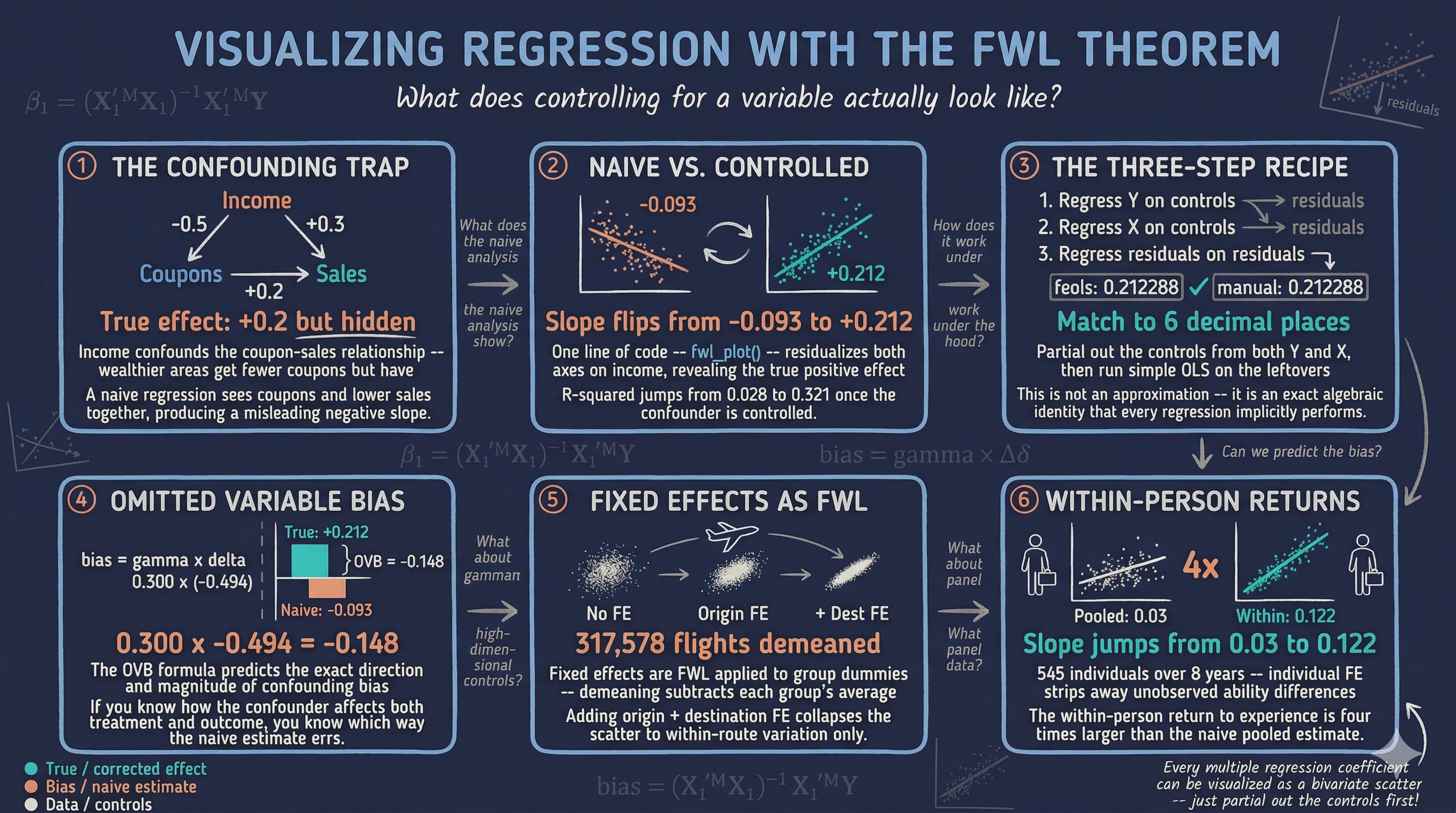
The Frisch-Waugh-Lovell (FWL) theorem provides the answer. It says that the coefficient on any variable in a multiple regression equals the slope from a simple bivariate regression — after first “partialling out” the other variables from both the outcome and the variable of interest. Partialling out means regressing a variable on the controls and keeping only the leftover (residual) variation — the part that the controls cannot explain. This means we can visualize any regression coefficient as a 2D scatter plot, as long as we first remove the influence of the controls from both axes.
The fwlplot R package (Butts & McDermott, 2024) turns this into a one-liner. It uses the same formula syntax as fixest::feols() — including the | operator for fixed effects — and produces a scatter plot of the residualized data with the regression line overlaid. The result is a visual answer to “what does controlling for X look like?”
This tutorial builds intuition progressively. We start with simulated data where we know the true effect, show how confounding creates a misleading picture, and use fwl_plot() to reveal the truth. We then extend to real data with high-dimensional fixed effects — first flights data (controlling for origin and destination airports) and then panel wage data (controlling for unobserved individual ability).
Learning objectives:
- State the FWL theorem and explain its geometric intuition
- Use
fwl_plot()to visualize a bivariate relationship before and after controlling for confounders - Demonstrate that manual FWL residualization reproduces
feols()coefficients exactly - Visualize what fixed effects “do” to data by comparing raw vs. residualized scatter plots
- Apply
fwl_plot()to real panel data with high-dimensional fixed effects - Connect FWL to omitted variable bias and Simpson’s paradox
2. The Modeling Pipeline
graph LR
    A["Simulated<br/>Data<br/>(Section 3)"] --> B["fwl_plot()<br/>Naive vs. FWL<br/>(Section 4)"]
    B --> C["Manual FWL<br/>Verification<br/>(Section 5)"]
    C --> D["Fixed Effects<br/>Flights Data<br/>(Section 6)"]
    D --> E["Panel Data<br/>Wages<br/>(Section 7)"]
    E --> F["ggplot2<br/>& Recipe<br/>(Section 8)"]

    style A fill:#6a9bcc,stroke:#141413,color:#fff
    style B fill:#d97757,stroke:#141413,color:#fff
    style C fill:#d97757,stroke:#141413,color:#fff
    style D fill:#6a9bcc,stroke:#141413,color:#fff
    style E fill:#6a9bcc,stroke:#141413,color:#fff
    style F fill:#00d4c8,stroke:#141413,color:#fff
We start where the answer is known (simulated data), see the result with fwl_plot() first, then peek under the hood with manual FWL verification. From there we apply the same one-liner to increasingly complex real-world settings.
3. Setup and Data
3.1 Install and load packages
# Install packages if needed
cran_packages <- c("fwlplot", "fixest", "ggplot2", "patchwork",
                    "nycflights13", "wooldridge")
missing <- cran_packages[!sapply(cran_packages, requireNamespace, quietly = TRUE)]
if (length(missing) > 0) install.packages(missing)

library(fwlplot)
library(fixest)
library(ggplot2)
library(patchwork)
library(nycflights13)
library(wooldridge)
The fwlplot package provides the fwl_plot() function for FWL-residualized scatter plots. It is built on fixest, which handles the residualization computation using fast demeaning algorithms. The patchwork package lets us combine multiple ggplot2 plots side by side. The nycflights13 and wooldridge packages provide the real datasets we will use later.
3.2 Simulated confounding data
To build intuition, we simulate a retail scenario where a store manager wants to know whether distributing coupons increases sales. The catch: income is a confounder — wealthier neighborhoods receive fewer coupons (the store targets promotions at lower-income areas) but have higher baseline sales. This creates a spurious negative correlation between coupons and sales, even though coupons genuinely boost sales.
The causal structure looks like this:
graph TD
    Income["Income<br/>(confounder)"]
    Coupons["Coupons<br/>(treatment)"]
    Sales["Sales<br/>(outcome)"]

    Income -->|"-0.5<br/>(fewer coupons<br/>to rich areas)"| Coupons
    Income -->|"+0.3<br/>(rich areas<br/>buy more)"| Sales
    Coupons -->|"+0.2<br/>(true causal<br/>effect)"| Sales

    style Income fill:#d97757,stroke:#141413,color:#fff
    style Coupons fill:#6a9bcc,stroke:#141413,color:#fff
    style Sales fill:#00d4c8,stroke:#141413,color:#fff
Income opens a “backdoor path” from coupons to sales: coupons ← income → sales. Unless we block this path by controlling for income, the naive estimate will be biased. The data generating process is:
$$\text{income} \sim N(50, 10)$$
$$\text{coupons} = 60 - 0.5 \times \text{income} + \epsilon_1, \quad \epsilon_1 \sim N(0, 5)$$
$$\text{sales} = 10 + 0.2 \times \text{coupons} + 0.3 \times \text{income} + \epsilon_2, \quad \epsilon_2 \sim N(0, 3)$$
In words, the true causal effect of coupons on sales is +0.2: each additional coupon increases sales by 0.2 units. But because income negatively drives coupons ($-0.5$) and positively drives sales ($+0.3$), a naive regression of sales on coupons alone will confound the coupon effect with the income effect, producing a biased estimate. The noise terms $\epsilon_1$ and $\epsilon_2$ correspond to the rnorm() calls in the code below.
set.seed(42)
n <- 200

income    <- rnorm(n, mean = 50, sd = 10)
dayofweek <- sample(1:7, n, replace = TRUE)
coupons   <- 60 - 0.5 * income + rnorm(n, 0, 5)
sales     <- 10 + 0.2 * coupons + 0.3 * income + 0.5 * dayofweek + rnorm(n, 0, 3)

store_data <- data.frame(
  sales   = round(sales, 2),
  coupons = round(coupons, 2),
  income  = round(income, 2),
  dayofweek = dayofweek
)

head(store_data)
  sales coupons income dayofweek
1 40.02   27.79  63.71         4
2 31.37   34.03  44.35         5
3 31.30   28.01  53.63         6
4 34.37   28.68  56.33         4
5 42.62   35.91  54.04         5
6 39.50   33.45  48.94         4
round(cor(store_data[, c("sales", "coupons", "income")]), 3)
         sales coupons income
sales    1.000  -0.166  0.500
coupons -0.166   1.000 -0.709
income   0.500  -0.709  1.000
The correlation matrix confirms the confounding structure. Coupons and sales have a negative raw correlation (-0.166), even though the true causal effect is positive (+0.2). This is because income is strongly negatively correlated with coupons (-0.709) and strongly positively correlated with sales (0.500). A naive analysis would conclude that coupons hurt sales — a classic instance of Simpson’s paradox, where the direction of an association reverses when a confounding variable is accounted for.
4. fwl_plot() in Action: Naive vs. Controlled
4.1 The naive scatter
The simplest way to see why confounding is dangerous: plot the raw relationship with fwl_plot(). When no controls are specified, fwl_plot() produces a standard scatter plot with a regression line:
fwl_plot(sales ~ coupons, data = store_data, ggplot = TRUE)
The slope is -0.093 ($p = 0.019$): coupons appear to reduce sales. This is statistically significant but substantively wrong — the true effect is +0.2. The store manager who trusts this analysis would cancel the coupon program, losing real revenue.
4.2 Controlling for income: one line of code
Now watch what happens when we add income as a control — just add it to the formula:
fwl_plot(sales ~ coupons + income, data = store_data, ggplot = TRUE)
The slope reverses to +0.212 ($p < 0.001$) — close to the true value of +0.2. The fwl_plot() function residualized both coupons and sales on income behind the scenes, then plotted the residuals. The figure below shows both panels side by side:

The left panel shows the raw relationship: more coupons, lower sales (a downward slope). The right panel shows the same data after removing the influence of income from both axes. Once income is partialled out, the true positive effect of coupons emerges clearly. This is what “controlling for income” looks like geometrically — and fwl_plot() produces it in a single line.
4.3 The regression table confirms
The fixest::feols() function produces the same coefficient, confirmed by etable() for side-by-side comparison:
fe_naive <- feols(sales ~ coupons, data = store_data)
fe_full  <- feols(sales ~ coupons + income, data = store_data)
etable(fe_naive, fe_full, headers = c("Naive", "Controlled"))
                         fe_naive            fe_full
                            Naive         Controlled
Dependent Var.:             sales              sales

Constant         36.93*** (1.397)   11.34*** (3.008)
coupons         -0.0934* (0.0393) 0.2123*** (0.0467)
income                            0.3004*** (0.0325)
_______________ _________________ __________________
S.E. type                     IID                IID
Observations                  200                200
R2                        0.02768            0.32148
Adj. R2                   0.02277            0.31459
Adding income as a control flips the coupon coefficient from -0.093 to +0.212 and increases the R-squared from 0.028 to 0.321. The income coefficient (0.300) is close to the true value of 0.3. Every number in this table corresponds to a visual feature of the fwl_plot() scatter plots above.
5. Under the Hood: Manual FWL Verification
5.1 The three-step recipe
The FWL theorem can be stated as a simple recipe. Think of it like measuring height for your age: instead of comparing raw heights, you compare how much taller or shorter each person is than the average for their age group. Similarly, FWL compares how much more or fewer coupons a store had for its income level, against how much more or fewer sales it had for its income level.
The three steps are:
- Regress sales on income, save the residuals (the part of sales that income cannot explain)
- Regress coupons on income, save the residuals (the part of coupons that income cannot explain)
- Regress the sales residuals on the coupon residuals — the slope is the coupon coefficient
# Step 1: Residualize sales on income
resid_y <- resid(lm(sales ~ income, data = store_data))
# Step 2: Residualize coupons on income
resid_x <- resid(lm(coupons ~ income, data = store_data))
# Step 3: Regress residuals on residuals
fwl_manual <- lm(resid_y ~ resid_x)

# Compare coefficients
cat("feols coefficient:     ", round(coef(fe_full)["coupons"], 6), "\n")
cat("Manual FWL coefficient:", round(coef(fwl_manual)["resid_x"], 6), "\n")
feols coefficient:      0.212288
Manual FWL coefficient: 0.212288
The coefficients match to six decimal places. This is not an approximation — it is an exact algebraic identity. Every time you run a multiple regression, the software is implicitly performing these three steps for each coefficient.
5.2 The formal theorem
For those who want the math, the FWL theorem states that in the regression $Y = X_1 \beta_1 + X_2 \beta_2 + \epsilon$, the coefficient $\hat{\beta}_1$ equals:
$$\hat{\beta}_1 = (\tilde{X}_1' \tilde{X}_1)^{-1} \tilde{X}_1' \tilde{Y}, \quad \text{where} \quad \tilde{Y} = M_{X_2} Y, \quad \tilde{X}_1 = M_{X_2} X_1$$
Here $M_{X_2} = I - X_2(X_2’X_2)^{-1}X_2'$ is the “residual-maker” matrix that projects out the effect of $X_2$. In our example, $Y$ is sales, $X_1$ is coupons, and $X_2$ is income. The tilded variables $\tilde{Y}$ and $\tilde{X}_1$ are the residuals from the resid() calls above.
5.3 Omitted variable bias: predicting the error
The confounding we saw is not mysterious — the omitted variable bias (OVB) formula predicts it exactly. When we omit income from the regression, the bias on the coupon coefficient is:
$$\text{bias} = \hat{\gamma} \times \hat{\delta}$$
In words, the bias equals the effect of the omitted variable on the outcome ($\hat{\gamma}$) multiplied by the relationship between the omitted variable and the treatment ($\hat{\delta}$). Here $\hat{\gamma}$ is the effect of income on sales (in the full model) and $\hat{\delta}$ is the coefficient from regressing coupons on income.
gamma_hat <- coef(fe_full)["income"]       # 0.3004
delta_hat <- coef(lm(coupons ~ income, data = store_data))["income"]  # -0.4937
ovb <- gamma_hat * delta_hat               # -0.1483

cat("OVB = gamma * delta:", round(ovb, 4), "\n")
cat("Naive ≈ True + OVB:", round(coef(fe_full)["coupons"] + ovb, 4), "\n")
cat("Actual naive:", round(coef(fe_naive)["coupons"], 4), "\n")
OVB = gamma * delta: -0.1483
Naive ≈ True + OVB: 0.064
Actual naive: -0.0934
The OVB formula predicts a bias of -0.148: income’s positive effect on sales ($\hat{\gamma} = 0.300$) times its negative relationship with coupons ($\hat{\delta} = -0.494$) produces a large negative bias. The predicted naive coefficient (true + bias = 0.212 + (-0.148) = 0.064) is close to the actual naive coefficient (-0.093) — the small discrepancy comes from sampling variation with $n = 200$. The key insight: the bias is predictable. If you know the direction of the confounder’s effects on both the treatment and the outcome, you know which way the naive estimate is biased.
5.4 Adding more controls
The FWL theorem extends naturally to any number of controls. The fwl_plot() call handles it automatically:
fe_full3 <- feols(sales ~ coupons + income + dayofweek, data = store_data)
etable(fe_naive, fe_full, fe_full3,
       headers = c("Naive", "+ Income", "+ Income + Day"))
                         fe_naive            fe_full           fe_full3
                            Naive           + Income     + Income + Day
Dependent Var.:             sales              sales              sales

Constant         36.93*** (1.397)   11.34*** (3.008)    9.640** (2.953)
coupons         -0.0934* (0.0393) 0.2123*** (0.0467) 0.2219*** (0.0454)
income                            0.3004*** (0.0325) 0.2961*** (0.0316)
dayofweek                                            0.4029*** (0.1095)
_______________ _________________ __________________ __________________
S.E. type                     IID                IID                IID
Observations                  200                200                200
R2                        0.02768            0.32148            0.36535
Adj. R2                   0.02277            0.31459            0.35564

The coupon coefficient progresses from -0.093 (naive, wrong sign), to +0.212 (controlling for income), to +0.222 (adding day of week). The R-squared jumps from 0.028 to 0.365 as we add controls. Each fwl_plot() panel shows a tighter cloud as more variation is absorbed by the controls — the residualized scatter becomes more focused on the coupon-specific variation in sales.
6. Visualizing Fixed Effects
6.1 What are fixed effects?
Fixed effects are a special case of the FWL theorem applied to group dummy variables. When we include airport fixed effects in a regression, we are “partialling out” airport-specific means — in other words, demeaning. Demeaning means subtracting each group’s average from every observation in that group. The result is that we compare each airport to itself rather than comparing different airports to each other.
Think of it like a race handicap. Raw times compare runners who started at different positions. Demeaning each runner’s times converts them to “how much faster or slower than their personal average,” making the comparison fair. The FWL theorem guarantees that this demeaning procedure produces the same coefficients as including a full set of dummy variables in the regression.
6.2 Flights data: progressive fixed effects
The nycflights13 dataset contains all domestic flights from New York’s three airports (EWR, JFK, LGA) in 2013. We ask: what is the relationship between air time and departure delay?
data("flights", package = "nycflights13")
flights_clean <- flights[complete.cases(flights[, c("dep_delay", "air_time", "origin", "dest")]), ]
flights_clean <- flights_clean[flights_clean$dep_delay < 120 & flights_clean$dep_delay > -30, ]

# Remove singleton origin-dest combos for stable FE estimation
od_counts <- table(paste(flights_clean$origin, flights_clean$dest))
flights_clean <- flights_clean[paste(flights_clean$origin, flights_clean$dest) %in%
                                names(od_counts[od_counts > 1]), ]

cat("Observations:", nrow(flights_clean), "\n")
Observations: 317578
We sample 5,000 flights for plotting (the regression line uses all data, only the plotted points are sampled to avoid overplotting):
set.seed(123)
flights_sample <- flights_clean[sample(nrow(flights_clean), 5000), ]
Now the power of fwl_plot() — three one-liners that progressively add fixed effects. In fixest syntax, the | operator separates regular covariates (left) from fixed effects (right), so dep_delay ~ air_time | origin + dest means “regress departure delay on air time, with origin and destination fixed effects”:
# No fixed effects
fwl_plot(dep_delay ~ air_time, data = flights_sample, ggplot = TRUE)

# Origin airport FE
fwl_plot(dep_delay ~ air_time | origin, data = flights_sample, ggplot = TRUE)

# Origin + destination FE
fwl_plot(dep_delay ~ air_time | origin + dest, data = flights_sample, ggplot = TRUE)

The visual transformation is striking. Panel A (no FE) shows a vague cloud with a nearly flat slope. Panel B (origin FE) removes the three origin-airport means, tightening the horizontal spread. Panel C (origin + destination FE) removes the 103 destination means as well, collapsing the air-time variation to within-route deviations.
6.3 Comparing regression tables
fe_none   <- feols(dep_delay ~ air_time, data = flights_clean)
fe_origin <- feols(dep_delay ~ air_time | origin, data = flights_clean)
fe_both   <- feols(dep_delay ~ air_time | origin + dest, data = flights_clean)

etable(fe_none, fe_origin, fe_both,
       headers = c("No FE", "Origin FE", "Origin + Dest FE"))
                    fe_none           fe_origin           fe_both
                      No FE           Origin FE  Origin + Dest FE
Dependent Var.:   dep_delay           dep_delay         dep_delay

air_time        -0.0031*** (0.0004) -0.0061*** (0.0005) -0.0067. (0.0034)
Fixed-Effects:  ------------------- ------------------- -----------------
origin                           No                 Yes               Yes
dest                             No                  No               Yes
_______________ ___________________ ___________________ _________________
Observations                317,578             317,578           317,578
R2                          0.00016             0.00594           0.01296
Within R2                        --             0.00058           1.19e-5
The air time coefficient changes as we add fixed effects: -0.003 (no FE), -0.006 (origin FE), -0.007 (origin + destination FE, significant at the 10% level only — the . marker indicates $p < 0.10$). The residualized scatter in Panel C answers a sharper question: “For flights on the same route, does longer-than-usual air time predict higher-than-usual departure delay?” The answer is weakly negative — routes with variable air times show slightly less delay when the flight takes longer, possibly because longer air times reflect favorable wind conditions.
7. Panel Data: Returns to Experience
7.1 The wage panel
The wagepan dataset from the Wooldridge textbook contains panel data on 545 individuals observed over 8 years (1980–1987). A classic question in labor economics is: what is the return to experience?
The challenge is unobserved ability. Two people with 5 years of experience may earn very different wages because one is more talented, motivated, or well-connected. These personal traits — which we cannot directly measure — are the “unobserved ability” that creates omitted variable bias. More talented workers earn higher wages and tend to accumulate experience in higher-paying jobs, so the naive correlation between experience and wages confounds ability with genuine experience effects.
data("wagepan", package = "wooldridge")
cat("Observations:", nrow(wagepan), "\n")
cat("Individuals:", length(unique(wagepan$nr)), "\n")
cat("Years:", length(unique(wagepan$year)), "\n")
Observations: 4360
Individuals: 545
Years: 8
7.2 Pooled OLS vs. individual fixed effects
fe_pool <- feols(lwage ~ educ + exper + expersq, data = wagepan)
fe_fe   <- feols(lwage ~ exper + expersq | nr, data = wagepan)
fe_twfe <- feols(lwage ~ exper + expersq | nr + year, data = wagepan)

etable(fe_pool, fe_fe, fe_twfe,
       headers = c("Pooled OLS", "Individual FE", "Individual + Year FE"))
                            fe_pool               fe_fe              fe_twfe
                         Pooled OLS       Individual FE Individual + Year FE
Dependent Var.:               lwage               lwage                lwage

Constant           -0.0564 (0.0639)
educ             0.1021*** (0.0047)
exper            0.1050*** (0.0102)  0.1223*** (0.0082)
expersq         -0.0036*** (0.0007) -0.0045*** (0.0006)  -0.0054*** (0.0007)
Fixed-Effects:  ------------------- -------------------  -------------------
nr                               No                 Yes                  Yes
year                             No                  No                  Yes
_______________ ___________________ ___________________  ___________________
Observations                  4,360               4,360                4,360
R2                          0.14772             0.61727              0.61850
Within R2                        --             0.17270              0.01534
Several things change as we add fixed effects. First, the educ coefficient disappears from the individual FE column — education is time-invariant for most individuals, so it is perfectly collinear with person dummies. Second, the exper linear term disappears from the two-way FE column — because experience increments by exactly one year for everyone, it is perfectly collinear with year dummies. Only expersq (which varies non-linearly across individuals) survives.
In the individual FE model, the experience coefficient increases from 0.105 to 0.122. This means the within-person return to experience is larger than the pooled estimate. The R-squared jumps from 0.148 to 0.617, showing that individual fixed effects explain the majority of wage variation — most of the “action” in wages comes from who you are, not how many years you have worked.
7.3 Visualizing the within-person variation
Again, fwl_plot() produces the before/after comparison in two one-liners. We sample 150 individuals for visual clarity (with 545 individuals the plot would be too dense):
set.seed(456)
sample_ids <- sample(unique(wagepan$nr), 150)
wage_sample <- wagepan[wagepan$nr %in% sample_ids, ]

# Raw bivariate relationship
fwl_plot(lwage ~ exper, data = wage_sample, ggplot = TRUE)

# With individual fixed effects
fwl_plot(lwage ~ exper | nr, data = wage_sample, ggplot = TRUE)

The visual difference is dramatic. Panel A plots the raw bivariate relationship with a shallow slope of about 0.03. The wide fan of points reflects unobserved ability differences: individuals at the same experience level have wildly different wages. Panel B (individual FE) strips away each person’s average wage and average experience, leaving only the within-person deviations. The slope steepens to 0.122 — more than three times larger — showing that a one-year increase in experience raises wages by about 12.2% within the same individual. The tighter cloud in Panel B shows that once we account for who each person is, the experience-wage relationship is much more precisely identified.
8. Customization and Quick Reference
8.1 ggplot2 integration
The fwl_plot() function can return a ggplot2 object by setting ggplot = TRUE, allowing full customization with ggplot2 layers and themes. This is useful for publication-quality figures with consistent styling, faceting, or combining multiple plots with patchwork:
p <- fwl_plot(sales ~ coupons + income, data = store_data, ggplot = TRUE)

fig5 <- p +
  labs(title = "FWL Visualization: Coupons Effect on Sales",
       subtitle = "After residualizing on income") +
  theme_minimal(base_size = 13)

8.2 Quick reference: fwl_plot() recipes
Here are the most common fwl_plot() patterns you will use:
# 1. Raw scatter (no controls)
fwl_plot(y ~ x, data = df)

# 2. Control for one or more variables
fwl_plot(y ~ x + control1 + control2, data = df)

# 3. Fixed effects (use | to separate)
fwl_plot(y ~ x | group_fe, data = df)

# 4. Multiple fixed effects
fwl_plot(y ~ x | fe1 + fe2, data = df)

# 5. Return ggplot2 object for customization
fwl_plot(y ~ x + control, data = df, ggplot = TRUE) + theme_minimal()

# 6. Sample points for large datasets (line uses all data)
fwl_plot(y ~ x | fe, data = big_data, n_sample = 5000)
8.3 Key arguments
| Argument | Purpose | Example |
|---|---|---|
formula |
Same as feols(): y ~ x + controls | FE |
sales ~ coupons + income |
data |
Input data frame | store_data |
ggplot |
Return ggplot2 object (default: base R) | ggplot = TRUE |
n_sample |
Sample N points for large datasets | n_sample = 5000 |
vcov |
Variance-covariance specification | vcov = "hetero" |
For large datasets like the flights data (317K+ observations), the n_sample argument is essential to avoid overplotting. The regression line is always computed on the full data — only the plotted points are sampled, so the slope is unaffected.
9. Discussion
The FWL theorem is not just a mathematical curiosity — it is the foundation of how modern regression software works. When fixest::feols() estimates a model with fixed effects, it does not literally create and invert a matrix with thousands of dummy variables. Instead, it uses the FWL logic to demean the data and run OLS on the residuals. This is why fixest can handle millions of observations with hundreds of thousands of fixed effects: the demeaning step is $O(N)$, while creating the full dummy matrix would be $O(N \times K)$.
As a diagnostic tool, FWL scatter plots reveal problems that regression tables hide. If the residualized scatter shows a curved relationship, your linear specification may be wrong. If it shows outliers, they may be driving the coefficient. If the cloud collapses to a near-vertical line (as in Panel C of the flights figure), the within-group variation may be too small to identify the effect reliably.
The FWL theorem also connects to more advanced methods. Double Machine Learning (Chernozhukov et al., 2018) generalizes the partialling-out idea by using machine learning models instead of linear regression to residualize the data. The Python FWL tutorial on this site takes that next step. The fwlplot package does not do DML, but the visual intuition — “look at the residualized scatter to see the conditional relationship” — carries over directly.
One limitation: the FWL theorem applies only to linear regression. For logistic regression, Poisson regression, or other nonlinear models, the partialling-out logic does not hold exactly. The residualized scatter plot for a nonlinear model is at best an approximation of the conditional relationship, not an exact representation.
10. Summary and Next Steps
- Confounding produces misleading regressions: in our simulated data, the naive coupon coefficient was -0.093 (coupons “hurt” sales), while the true causal effect is +0.2. After controlling for income via
fwl_plot(), the estimate was +0.212, recovering the true effect. - The OVB formula predicts the bias exactly: the bias was $0.300 \times (-0.494) = -0.148$, correctly predicting the negative direction and approximate magnitude of the confounding.
- FWL is not an approximation — it is an exact algebraic identity: the coefficient from partialling out controls matches
feols()to six decimal places. Every multiple regression coefficient can be visualized as a bivariate scatter plot. - Fixed effects are FWL applied to group dummies: the flights data showed how adding origin and destination FE progressively transformed the scatter. The air-time coefficient changed from -0.003 (no FE) to -0.007 (origin + destination FE).
- Panel FE reveal within-person effects: the wage data showed that controlling for individual ability via FE steepened the bivariate experience slope from 0.03 (pooled, no controls) to 0.122 (within-person), more than tripling the estimated return to experience.
For further study, see the companion Python FWL tutorial that extends the partialling-out logic to Double Machine Learning, and the R DID tutorial that uses fixest for difference-in-differences with staggered treatment adoption.
11. Exercises
-
Omitted variable direction. Use the OVB formula from Section 5.3 to predict what happens if you also omit
dayofweek(in addition to income). Run the naive regressionlm(sales ~ coupons)and compare the bias to $\hat{\gamma}_{income} \times \hat{\delta}_{income} + \hat{\gamma}_{day} \times \hat{\delta}_{day}$. Does the extended OVB formula still predict the direction correctly? -
Multiple controls. Use
fwl_plot()to visualize the coupon effect after controlling for both income anddayofweek. Compare this to controlling for income alone. Does the scatter change visually? Does the coefficient change? -
Your own data. Pick a dataset from the
wooldridgepackage (e.g.,hprice1,wage2,crime2) and usefwl_plot()to visualize a regression relationship before and after adding controls. Does the coefficient change substantially? Can you identify what the confounder is doing?
12. Datasets
The datasets used in this tutorial are saved as CSV files in the post directory for reuse in other tutorials:
| File | Rows | Description |
|---|---|---|
store_data.csv |
200 | Simulated retail data (sales, coupons, income, dayofweek) |
flights_sample.csv |
5,000 | Cleaned NYC flights sample (delays, air time, origin, dest) |
wagepan.csv |
4,360 | Wooldridge wage panel (545 individuals, 8 years) |
13. References
- Butts, K. & McDermott, G. (2024). fwlplot: Scatter Plot After Residualizing. CRAN.
- Frisch, R. & Waugh, F. V. (1933). Partial Time Regressions as Compared with Individual Trends. Econometrica, 1(4), 387–401.
- Lovell, M. C. (1963). Seasonal Adjustment of Economic Time Series and Multiple Regression Analysis. JASA, 58(304), 993–1010.
- Berge, L. (2018). fixest: Fast Fixed-Effects Estimations in R. CRAN.
- Angrist, J. D. & Pischke, J.-S. (2009). Mostly Harmless Econometrics. Princeton University Press.
- Chernozhukov, V. et al. (2018). Double/Debiased Machine Learning for Treatment and Structural Parameters. The Econometrics Journal, 21(1), C1–C68.

Carlos Mendez
Associate Professor of Development Economics
My research interests focus on the integration of development economics, spatial data science, and econometrics to better understand and inform the process of sustainable development across regions.